
Review your balance
Check the available-credit strip and estimate the cost of the work still planned before buying more.
Creavax product guide
Plans lists prepaid credit packages with their price, total credits, validity, offers and transfer rules so purchases can match the real production schedule.
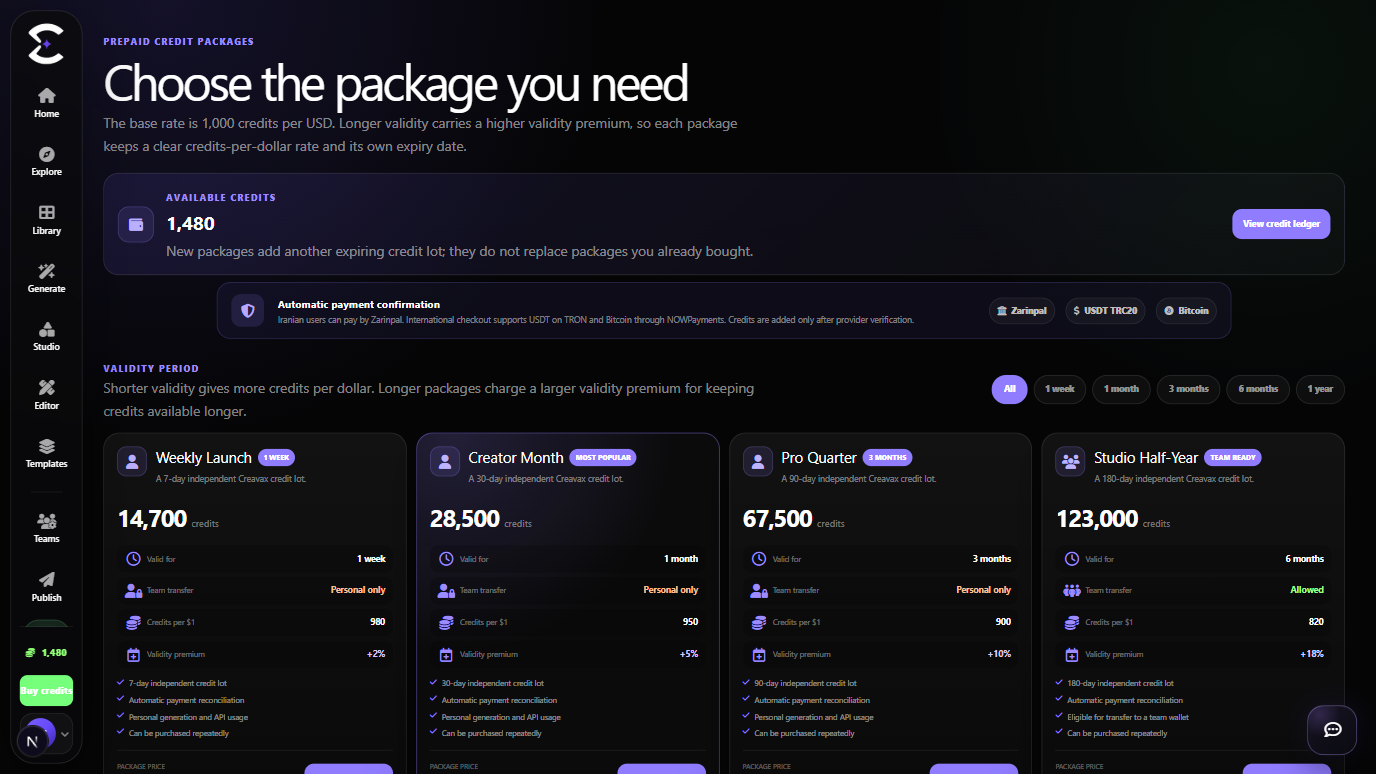
Every purchase creates its own credit lot with its own expiry conditions. New packages add balance; they do not rewrite earlier lots.
Quick start
Follow this order for a clean first pass. You can return to the deeper sections when a permission, billing choice or destructive action needs more context.
Check the available-credit strip and estimate the cost of the work still planned before buying more.
Choose a package duration that matches the real production schedule rather than selecting only by headline price.
Compare total credits, bonus, discount, availability deadline, features and team-transfer eligibility.
Confirm the selected package in checkout, then review the granted balance and transaction record after payment.
Core capabilities
Use these capabilities to understand what belongs here, what connects to another workspace and which actions change public, billing or account state.
Each purchase keeps its own granted amount and expiry date, including repeated purchases of the same package.
Filter available packages by duration so short and long production windows are easier to compare.
Supported package cards can show bonuses, active discounts, badges, features and availability deadlines.
A package clearly states whether its personal credits may later be contributed to a shared team wallet.
Detailed workflow
These sections explain the decisions that matter most before you organize assets, spend credits, publish content, collaborate or change account access.
The cheapest card is not automatically the best choice. Compare the number of credits, package validity, current price, bonus, features and whether team transfer is allowed.
Short validity can suit a focused campaign. Longer validity reduces the risk that unused balance expires before a slower production schedule is complete.
Buying another package adds a new credit lot. It does not replace an earlier lot and does not reset every previous expiry date.
The wallet can consume eligible credits according to expiry order, so the transaction and credit-lot views explain why one package balance is used before another.
Choosing a package opens checkout with that package identifier. Verify the package name, credits, displayed currency and final price before completing payment.
After the grant is recorded, use the wallet or credit ledger to confirm the new balance. Use Teams only when eligible personal credits should be transferred to a shared account.
Best practices
Frequently asked
Quick answers to the questions that most often come up before using this workspace.
Yes. Each completed purchase creates a separate credit lot with its own original validity and expiry date.
No. It adds another lot. Existing granted lots continue under their own conditions until used or expired.
No. Each package card states whether team transfer is allowed or whether the credits are personal only.
Continue learning
Continue with the next workspace only when it supports the same task, billing context or publishing flow.
Ready to use the real workspace?
Open Plans, complete one small real task and return to this page when you need the detailed workflow.